September 12, 2010

Modo Gears - Gears asset


Read this first

Welcome to the first Modo Gear!

To inaugurate this collection, I think is a good idea to talk about… gears!

This is a mini tutorial on how you may create a gear starting from a dedicated mesh asset. It's a 96 sides poly cylinder with beveled caps, a good start to generate a large set of gears. The theory is that 96 is divided by 2, 3, 4, 6, 8, 12, so we can extrude the needed cogs dimension/number, extremely useful if two or more gears must work together.

The first step is to download this mesh and put it into your assets folder.

Modo Asset

From now, you may double click it in your preset browser and work as I do in this video.


A better resolution video here

At this level we don't need to subdivide the mesh, but we can bevel the edges if needed.

Modo Gears


We love Luxology Modo because it's one of the most powerful 3D application out there.
But it is not so powerful as we expect out of box, because of many things that are not so intuitive or not so fast or not so fantastic as they really are before some "adjustement" or "shrewdness".

"Modo Gears" is a collection of tips&tricks, configs, tutorials, scripts that may help you to enhance your workflow with Luxology Modo.

Everything you may read or download in this section is NOT the "one way" to use the program or do the work, but may be the best way I FOUND to use Luxology Modo to do my job. You may consider this section as a collection of different ways to do your job. You are the one who can say what's the best way for you.

Everyone is invited to show me where I'm wrong or a better way to do the work, I will always thank you for that.

This section is not built to learn the basics of Luxology Modo, this section is enabled for the user who know where the tool is. I use Modo in a different way compared to the default settings and layouts, so don't ask me "where I can find that tool you put in your pie menu" or "what shortcut you press for that operation". For basics tutorials, you may find more answers in Luxology basics tutorials or user's dedicated basics tutorials.

Hope you enjoy my gears!

July 24, 2010

Farnetella


Year: 2010
Softwares: Modo 401 - Photoshop CS3
Notes:
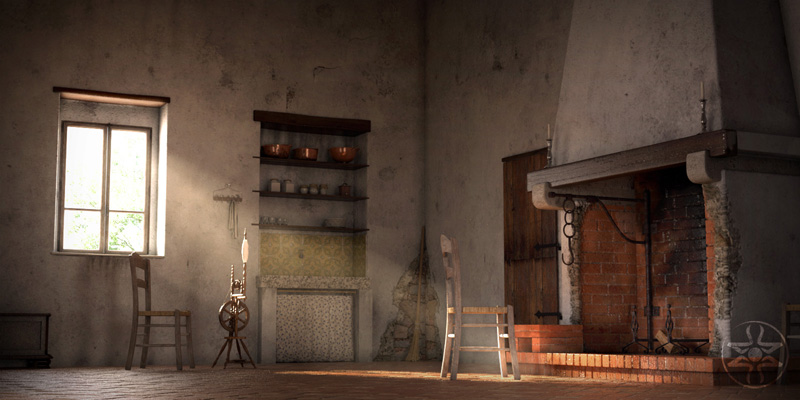
It's a rural house in Farnetella, Toscana (Tuscany) and I love these places.

The image "Farnetella" was built as a test scene for 32 bit compositing worflow in Photoshop CS3. But the result was disappointing because of some render layers problems and all the limit [and frustrations] I found in Photoshop CS3 with 32 bits compositing [I hate that program, it's official...]. I promised myself new tests but with other compositing programs as Nuke or After Effects [I know this one is not properly a compositing program, but it's far better than Photoshop]. I will share new tests results.

For this last result, I put aside Modo render passes and launched a final render with a separated volumetric pass. Then I composited everything in Photoshop with a series of correction layers to increase the "mood".

Just a little bumpy and noisy, I know, but there is not additional time fot this test scene.

Screenshots and models:
Part I
Part II

March 9, 2010

Sun, lovely sun...

I'm working on a new worflow to get the best from Modo in less time, just using "11/12" render passes then composited in Photoshop at 32bits.


It's a rural house in Farnetella, Toscana (Tuscany) and I love these places.

Actually I'm not sure about the illumination 'cause I'm working on a LCD "non professional" monitor, but I'll calibrate the levels for a final version on my trustworthy CRT.

All I can say is that working in render passes with Modo is absolutely functional. I did a lot of test to correctly match the final render and it is very hard to composit 32bits render passes in Photoshop CS3 (bad program, BAD PROGRAM!). After this, I will composit my file with a better program as After Effects.

September 23, 2009

THR3aD #004

Finally it's out!


New release, entirely dedicated to Condivisione Creativa 2 [the kitchen, in less words].

Run to "free" download the e-zine!

LINK >>
Related Posts Plugin for WordPress, Blogger...